Creating and editing events
Add, move, resize, edit, and delete events on your calendar.
Last updated 3 months ago
Events are the building blocks of your calendar. Here is how to work with them directly on the month grid.
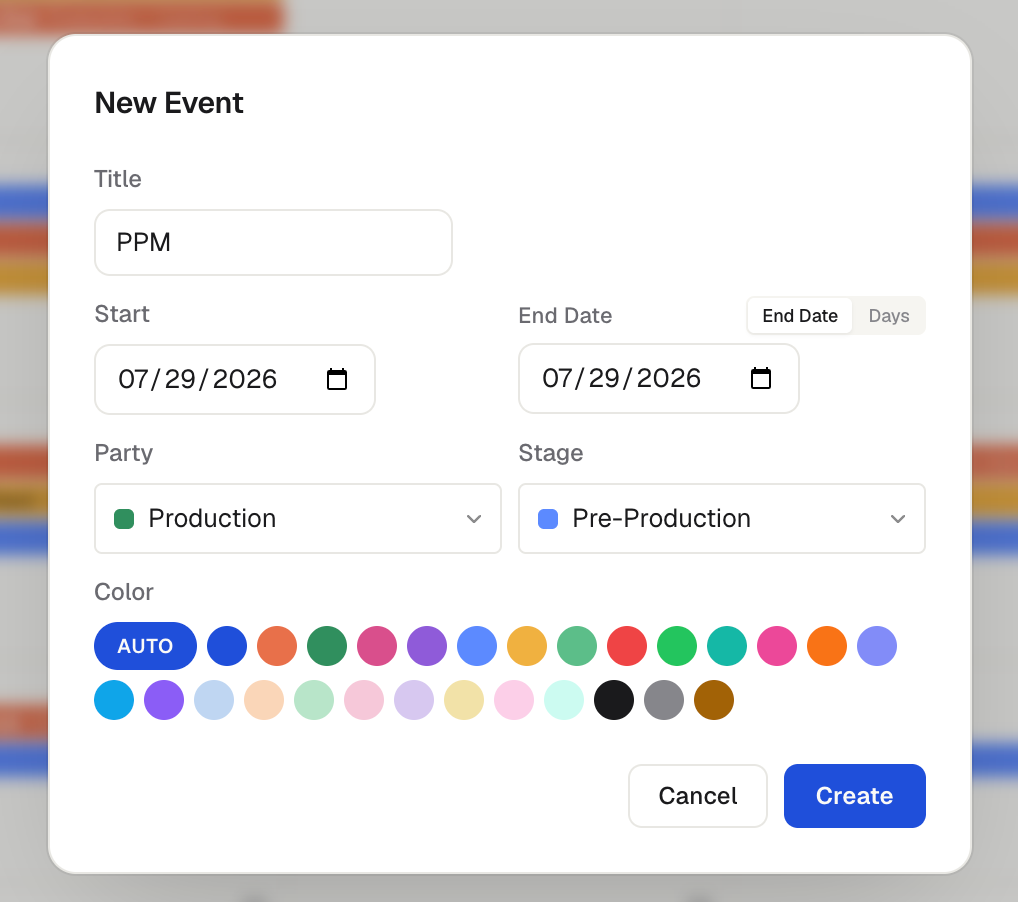
Create an event
Double-click a day to create a single-day event. The window that opens has an Event / Note switch at the top, so the same double-click can also start a note.
Click and drag across days to create a multi-day event.
Move and resize
To move an event, click and drag it to a new date.
To extend or shorten it, hover over the front or end edge and drag.
Edit an event
Right-click an event and choose Edit Event, or simply click on the event. In the event window you can set the Title, the Start and end (toggle between an End Date and a number of Days), Skip weekends, the Party and Stage, the Color, and the text alignment inside the bar. Below those you can mark the event Internal or Lock it. See Locking events and Skip weekends on an event for how those two behave.
Duplicate, copy, and paste
Right-click an event and choose Duplicate to drop an identical copy on the same dates — same name, color, party, stage, and duration.
Or choose Copy, then right-click any day and choose Paste to place a copy starting on that day.
Need to reuse several at once? See Selecting multiple events. Undo any paste or duplicate with ⌘Z / Ctrl+Z.
Delete an event
Right-click the event and choose Delete, or open it and use the Delete button. Made a mistake? Press Cmd/Ctrl + Z to undo.
Was this helpful?
Still need help? Ask the team