Filtering your calendar
Show, hide, or isolate events by party or stage.
Last updated 3 months ago
Filters let you customize what you see on the calendar at any moment, without changing the underlying events.
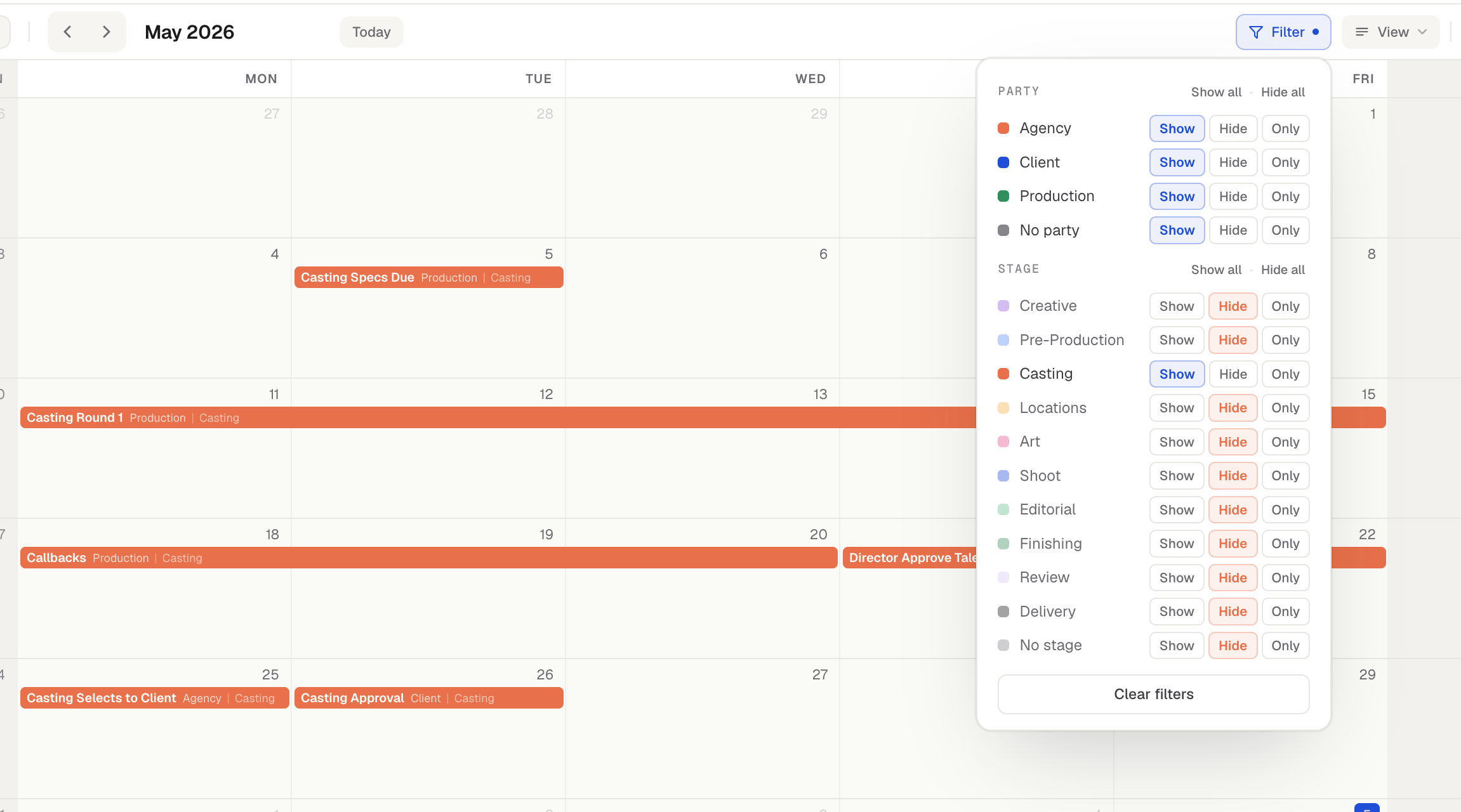
Show, Hide, or Only
Open Filter. For each party and stage you can choose:
Show or Hide to bring specific parties or stages in or out of view.
Only to isolate one. For example, to single out the casting process on a loaded production calendar, click Only next to Casting and the calendar shows just the casting events. Click Only again to return to your previous view.
Use Show all or Hide all to act on everything at once, and Clear filters to reset.
Filters apply to List view too
Whatever you filter on the calendar carries over to the List view, so both stay in sync.
Filters scope your actions
Filters don’t just change what you see. Push & Pull and multi-select bulk changes apply only to the events currently in view — events hidden by a filter are never moved, edited, or deleted by those actions.
The Filter menu also has a Notes row to show or hide notes for your session. New events created in a filter view default to a party and stage that appear in that view, so what you just made never vanishes behind your own filter.
Was this helpful?
Still need help? Ask the team