View options: size, theme, weekends, and more
Adjust how your calendar looks from the View menu.
Last updated 3 months ago
The View menu at the top right of the calendar controls how it looks. None of these settings change your events, only how they are displayed.
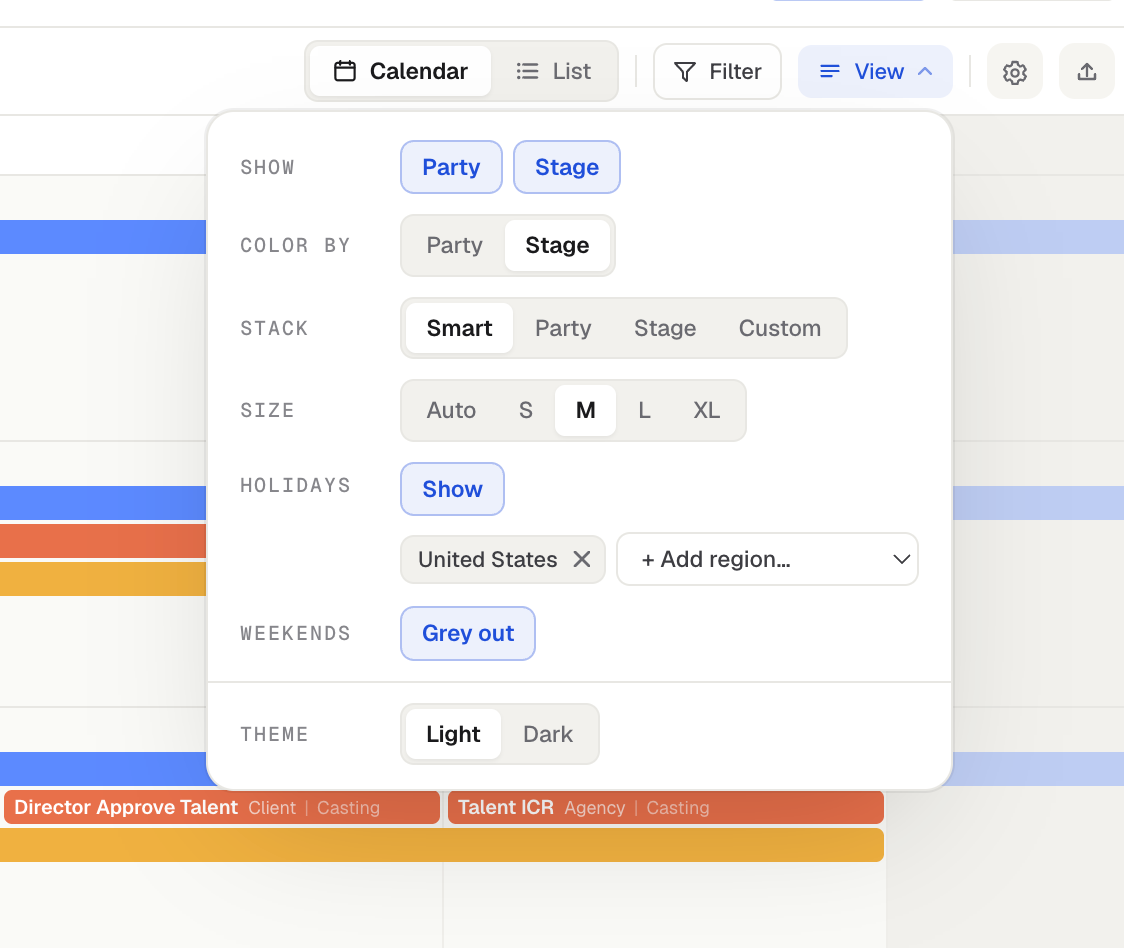
Show
Toggle Party and Stage on or off to control what appears on the event bars.
Color by
Color events by Party or Stage (see Coloring your calendar).
Stack
Choose how overlapping events stack on busy days.
Size
Set the event size: Auto, S, M, L, or XL. Auto adjusts the size based on how crowded the calendar is. M (Medium) is a good middle ground for PDF exports and share links: readable, but still able to fit a crowded calendar.
Holidays and Weekends
Turn on Holidays to show public holidays (see Holidays on your calendar).
The Weekends row has two options: Grey out tints weekend columns, and Hide removes them for a five-day Monday to Friday grid. Hiding weekends is a view setting only. Events and notes keep their real dates, and anything that sits entirely on a weekend stays in List view and exports.
Theme
Switch this calendar between Light and Dark.
Was this helpful?
Still need help? Ask the team